Cloud Cost Optimization
Icanio optimized cloud costs by reducing spend 15–25%, improving visibility, governance, and accountability, while enabling predictable, scalable, and efficient cloud operations

Most production systems use Read Committed — but many teams don’t fully understand how it behaves under heavy concurrency.
If your application experiences:
You need to understand this
Read Committed is the default isolation level in SQL Server.
It prevents Dirty Reads But allows Non-Repeatable Reads and Phantom Reads
Result:
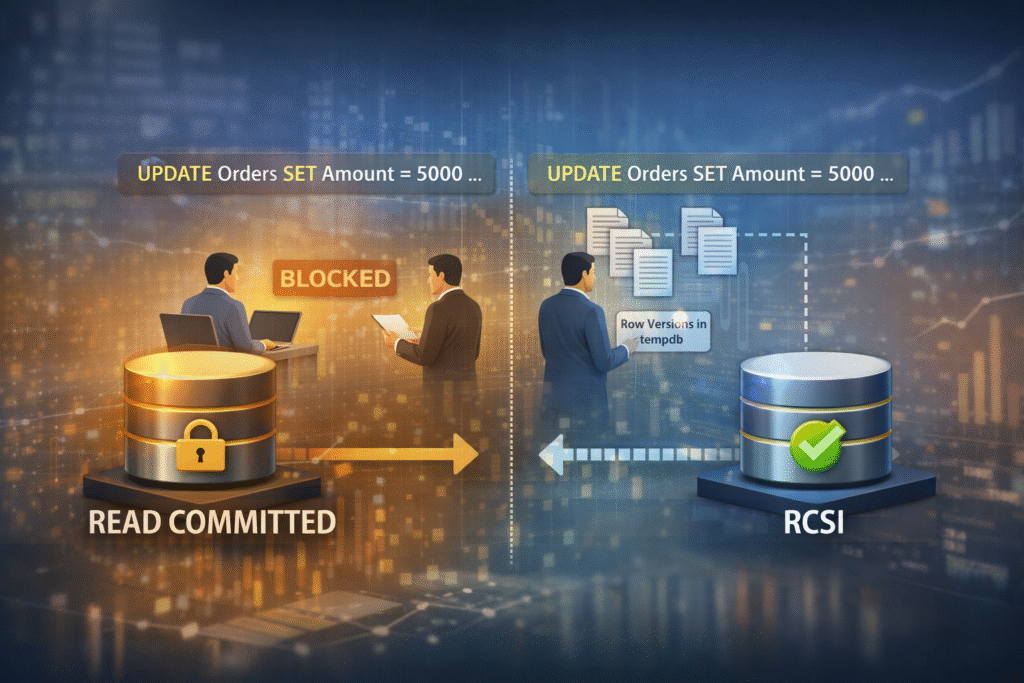
Read and Write operations can block each other.
RCSI is an enhanced version of Read Committed that uses Row Versioning instead of Shared Locks for reads.
Instead of waiting, readers access the last committed version of a row stored in tempdb.
Readers don’t block writers. Writers don’t block readers. Still prevents Dirty Reads
RCSI is enabled at the database level:
ALTER DATABASE YourDatabase
SET READ_COMMITTED_SNAPSHOT ON;
⚠ Requires exclusive database access during change.
After enabling, existing Read Committed queries automatically use row versioning.
No application code change required.
Without Snapshot:
With RCSI:
Dirty Reads
Read Blocks Write
Write Blocks Read
Uses tempdb
Code Changes Needed
Reduces blocking dramatically
Use RCSI if:
Avoid or evaluate carefully if:
In modern web APIs (especially .NET + SQL Server stacks), enabling RCSI often:
It’s one of the most underused performance improvements in SQL Server.
Icanio optimized cloud costs by reducing spend 15–25%, improving visibility, governance, and accountability, while enabling predictable, scalable, and efficient cloud operations
Take control of JIRA with a self-hosted Data Center on AWS, combining high availability, automated infrastructure, and enterprise-grade security to deliver scalable performance wit
Stop juggling DevOps tools. This CI/CD automation platform unifies pipelines, automates infrastructure, and enables secure, real-time monitored deployments helping teams release so
Break free from legacy compliance systems. This cloud-native content assurance platform uses microservices, Azure DevOps pipelines, and Kubernetes orchestration to deliver secure,

© 2025